Applications & operations Comparison
CRM Dilemma : Choosing between In-house and Off the shelf CRM Solutions
CRM Dilemma : Choosing between In-house and Off the shelf CRM Solutions Introduction Its that exciting time. Your business has outgrown the humble spreadsheet, and...
In this article 0 sections
Introduction
It’s that exciting time. Your business has outgrown the humble spreadsheet, and it’s time for something more substantial. A proper CRM software solution. And that’s when the big question pops up: Do we build it ourselves, or go with a standard option?
The idea of a custom-built system can sound incredibly tempting. A setup that has every feature you need, none that you don’t, and one that aligns perfectly with how your team sells. The promise feels irresistible: total alignment with your business processes, a perfect fit. It’s like getting a suit tailored just for you.
But before you dive into development, it’s important to zoom out and understand what’s really at stake.
With this guide, we hope to answer some of the tough questions businesses like yours face when choosing a CRM, such as:
- What’s a CRM system used for these days?
- How do you choose the best CRM software for your small business?
- Why do so many companies struggle with CRM software development?
- Is there such a thing as truly affordable CRM software that still does the job well?
- What are the actual benefits of CRM software, beyond just tracking sales?
- How does customer service CRM software fit into the bigger picture?
- Can a low-code platform really simplify how we use CRM software?
Now that we’ve set the stage, let’s dig into why so many businesses get tripped up - especially when trying to build their own CRM software from scratch.
But the truth is - too many companies get burned by going the in-house route. Here’s how it usually goes down:
1. The excitement phase
Everyone’s pumped about getting a CRM software that’s “just right” for their unique needs. Developers are ready to roll up their sleeves, sales and support have been promised everything they need, and you’re happy that you’re getting software that understands your business. Nothing wrong with the intent and approach.
2. The reality check
Turns out, that building a CRM from scratch is way more complex than anyone anticipated. There are endless requests from different teams. Development struggles to keep up with the pace of business. Features get delayed, bugs pop up, and frustration starts to build.
3. The rift
A gap forms between the tech team and the business folks. Fingers start pointing, and communication breaks down. Marketing teams often found themselves starved of data. Salespeople juggle multiple sources to piece together their revenue figures. And customer service departments are stranded without tools to automate processes and gauge their capacity.
4. The regret
Eventually, the excitement fades. The investment feels like a sunk cost. Teams begin to question why they didn’t just start with a tried-and-tested CRM software solution from the get-go - one with support, features, and faster time-to-value.
Actually, most of the challenges with in-house CRMs aren’t about lack of effort or talent. They’re about the inherent limitations of building something from scratch. The problem is, that businesses want to move fast, and development can’t keep up. Even with agile methodologies, delivering a good product takes time, and that’s often ignored.
The gap between business stakeholders and the IT department widens, and it’s a recipe for disaster. New users might find themselves at a loss, trying to navigate a system without guidance. That’s because, with in-house, you never get a library of tutorial videos or extensive user support. It’s a nightmare, and it’s not the developers’ fault. They’re skilled and try hard, but they can’t keep up with the ever-changing demands of the business.
The failure of in-house CRM software is not a new problem. It’s been spoken and written about since the early 1990s. You’ll find report summaries pertaining to CRM failure, handily summarized, in Salesforce’s excellent editorial on ‘Why do CRM projects fail.’
Here’s a quick snapshot of some of the often-quoted figures around failures of CRM projects.
- Gartner Group (2001): They estimated a 50% + CRM failure rate.
- Butler Group (2002): Their estimate was a 70% failure rate.
- Selling Power (2002): Their CSO Forum reported a 69.3% failure rate.
- AMR Research (2005 – 2006): They reported fluctuating estimates over several years, ranging from 18% to 31%.
- Forrester Research (2009): Their estimate was 47%.
- VentureBeat (2015): They reported a 70% failure rate.
- DMN News (2016): Their research found estimates as high as 63% failure rate.
So it’s nothing new to say that CRM software fail. We’re asking a more nuanced question here. Why do in-house CRMs often turn out to be a mess? It’s not like your technical team didn’t try their best. They probably did, but there are some fundamental reasons why things go wrong.
First, let’s talk about the initial excitement. Your team was thrilled to start building a custom CRM software. They were eager to make it perfect, with all the bells and whistles. But, they didn’t take into account the future. That’s where the trouble starts.
When new requirements come up – and they always do – it’s hard to fit them into the existing structure. Your team starts to patch things up. They add quick fixes and workarounds. But, that’s not a sustainable solution. It’s like putting a band-aid on a deep wound. Pretty soon, the code becomes a mess. No one knows where to start or how to untangle it. It’s a nightmare. And, that’s not all. As time goes on, your team becomes more and more cautious. They’re scared to make changes because they don’t want to break anything.
Eventually, the technical team becomes a shared service role rather than a business partner. You’ll always hear them explaining why and why and why. They’re not able to innovate or help the business grow. They’re just trying to keep their heads above water. It’s sad and strange.
Companies pour time and money into creating something that, frankly, has been done before – and often better. It’s worth considering that some software developers (particularly when you outsource your in-house CRM development) might base your custom CRM software on an existing market solution. If that’s the case, why not skip the middleman and choose a pre-existing product that’s already refined? Or, is the choice really simple?
The perks of standard, off-the-shelf CRMs, are tempting.
- Standard CRMs usually are feature-rich and offer impressive UX/UI.
- These systems have been through rigorous testing across various industries.
- You get a hands-on preview of what you’re investing in.
- Assistance is just a call or click away.
But even rainbows have a dark side - and CRM software development isn’t exempt. Standard CRMs come with their own problems. Here’s the not-so-pretty truth:
- One size fits… nobody perfectly
These CRMs are built for the “average” company in your industry. That means your unique quirks and workflows might get squashed into a one-size-fits-all box.
- Bloatware
Get ready for features you’ll never use. You’ll still pay for them, and they’ll just clutter up your interface. This makes many of these tools less like affordable CRM software and more like overkill - especially for teams that only need core functionality.
- Scaling
As your business evolves, adding new features can be a real challenge. These platforms are often built using traditional CRM software development methods - meaning high code, slow iterations, and heavy dependence on internal or vendor dev teams. What starts as an affordable investment can quickly balloon into something far more costly.
So, are you stuck between a rock and a hard place?
Not really. There’s a middle ground - and that’s exactly what we’ll explore next.
We talked about the struggle of balancing a custom-built CRM with the ease of off-the-shelf options. The key is to move away from the old-school (high-code) approach. The old method of manually writing each code line is inefficient. Every line of code represents knowledge that needs constant care. Every line of code requires knowledge transfer to new employees. Every line of code can be a spanner in the works of a new feature.
The reality is that there’s a cost associated with every line of code you’re maintaining. Low-code builds a bridge, which you can walk over, and skip all this intricate code management effort. The idea is so simple, yet so powerful, that you have to see it to believe it.
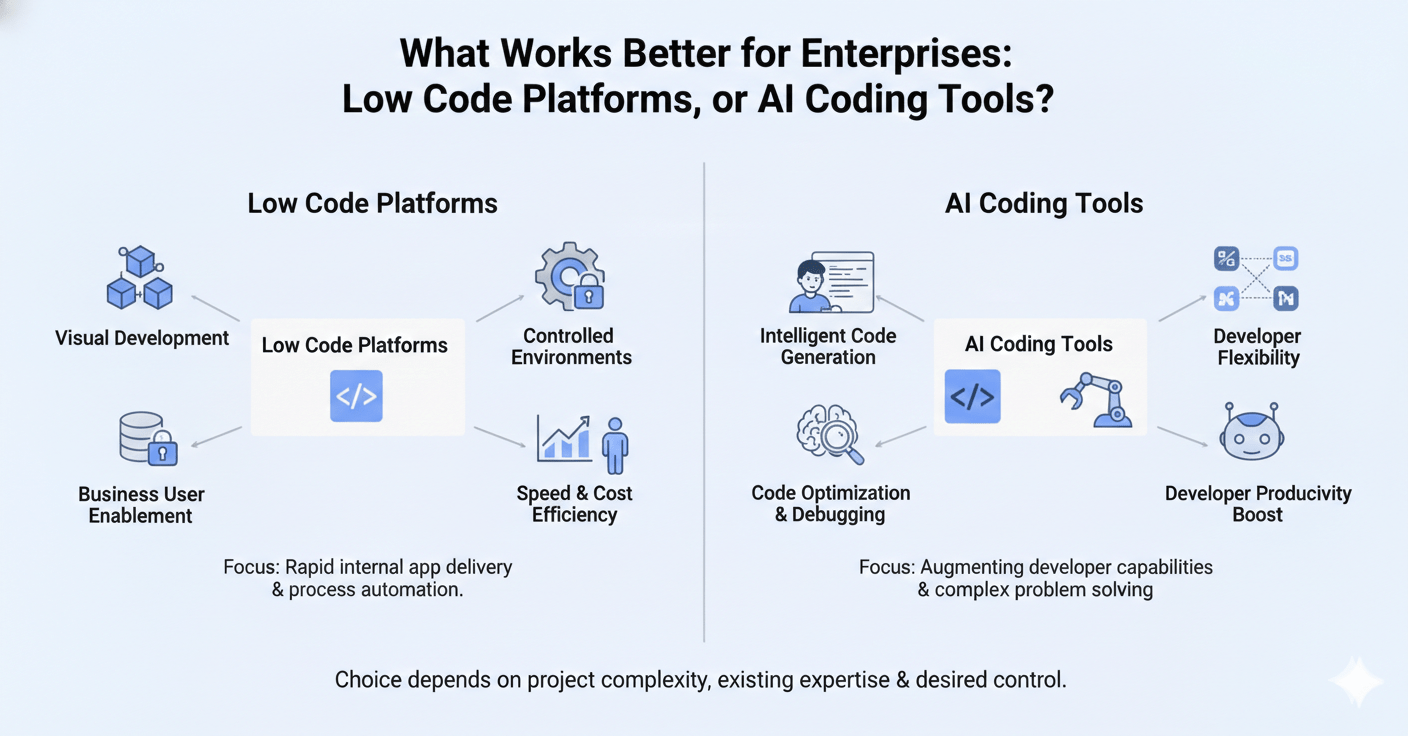
When it comes to CRMs, people often think it’s a choice between in-house or off-the-shelf. But what if I told you there’s a third option? One that combines the best of both worlds. This solution seems almost too good to be true, but it’s very much real: low-code CRM.
So, what exactly is a low-code CRM?
It’s a system designed for ease of use, allowing those with little to no coding experience to make customizations and adapt workflows easily. Imagine if the perfect CRM software for small business existed - where you could add new features yourself, at just 25% of the cost of hiring a developer. And fast enough that every user becomes the architect of their own workflow. That’s the power of low-code CRM.
A note of caution: Low-code has become quite the buzzword. Naturally, makers of standard CRM software want to use it too. Sadly, many vendors claim their CRM to be low-code when it actually is high-code with an added layer of GUI-based configurations. That is the same as proper low-code.
Low-code CRM empowers every user to think, “How can I make this CRM work faster for me?” It’ll no longer be or or .
This is where Amoga CRM steps in. While Amoga isn’t the only low-code CRM, it’s among the few that actually deliver a low-code CRM system and not a ‘high-code CRM with a few more configurations’.
When you ditch the “either-or” mentality and embrace the “both-and” power of low-code CRM, great things happen. For instance, our clients tell us that when they used Amoga’s low-code CRM, things changed. They’ll change for you too. Here’s how.
- With Amoga’s low-code platform, you to think like architects. They can drag-and-drop features, customize workflows, and build the perfect tool for their needs. This is what makes Amoga not just powerful - but practical. It delivers the affordable CRM software experience businesses are looking for, without sacrificing capability or control.
- Low-Code ditches the cycle of slow bug fixes and replaces it with . Need a new report? Build it yourself, instantly. Want to tweak a sales pipeline? Drag and drop it into place. No more waiting on IT, no more costly delays.
- Low-Code breaks down the walls between business and IT. It’s no longer a negotiation over resources; it’s a . Business users define the needs, build basic workflows, and test new features. IT, meanwhile, focuses on complex integrations, security, generative AI, and the overall technical backbone.
And here’s the clincher: Amoga is fast becoming known as one of the best CRM software in India - not just because of its features, but because it actually delivers on the low-code promise.
So, Book a Demo with Amoga to make your CRM future-ready!!
Frequently Asked Questions - Choosing between In-house and Off the shelf CRM Solutions
- What’s the difference between building a CRM and buying one off-the-shelf?
Custom CRM software development gives you full control and flexibility but comes with higher cost, complexity, and long timelines. Off-the-shelf CRM software is faster to deploy and comes with proven features but may not suit your exact needs. Low-code platforms offer the best of both worlds with quicker customization.
- Is it better to build CRM software or use a low-code platform?
Building CRM software in-house can take months or even years and often exceeds the budget. In contrast, low-code CRM platforms offer rapid development, reduced cost, and greater adaptability. You get the key CRM software benefits - customization, scalability, and control - without starting from scratch.
- What’s a CRM system, and do small businesses really need one?
A CRM system helps manage customer relationships, track leads, and streamline tasks. Yes, even small businesses benefit from using CRM software for small business - it helps save time, reduce errors, and improve sales.