Agentic enterprise software Guide
A Beginner's Guide to Low Code No Code Platforms
Key Highlights Low-code and no-code platforms are changing how we develop software. They help create apps faster with little or no coding needed. These platforms...

In this article 0 sections
Key Highlights
Low-code and no-code platforms are changing how we develop software. They help create apps faster with little or no coding needed.
These platforms use visual tools and drag-and-drop parts. This makes app development easier for more people, even business users who might not know much about tech.
Low-code platforms need some coding skills. They are often used by professional developers for quick application development and for more complex tasks.
No-code platforms don’t need coding at all. They let citizen developers build simple apps for specific business needs.
Both low-code and no-code platforms have great benefits. They help in faster development times, lower costs, and better flexibility. This allows businesses to adapt to market changes quickly.
Introduction
In today’s fast-changing digital world, businesses want effective ways to speed up their digital transformation. Traditional software development methods can take a lot of time and resources. This is why low-code and no-code platforms are changing the game. They make code development easier and help organizations improve their software development processes. By turning complex coding into visual tools and ready-made modules, these platforms allow more people to access application development.
Understanding Low Code and No Code Platforms
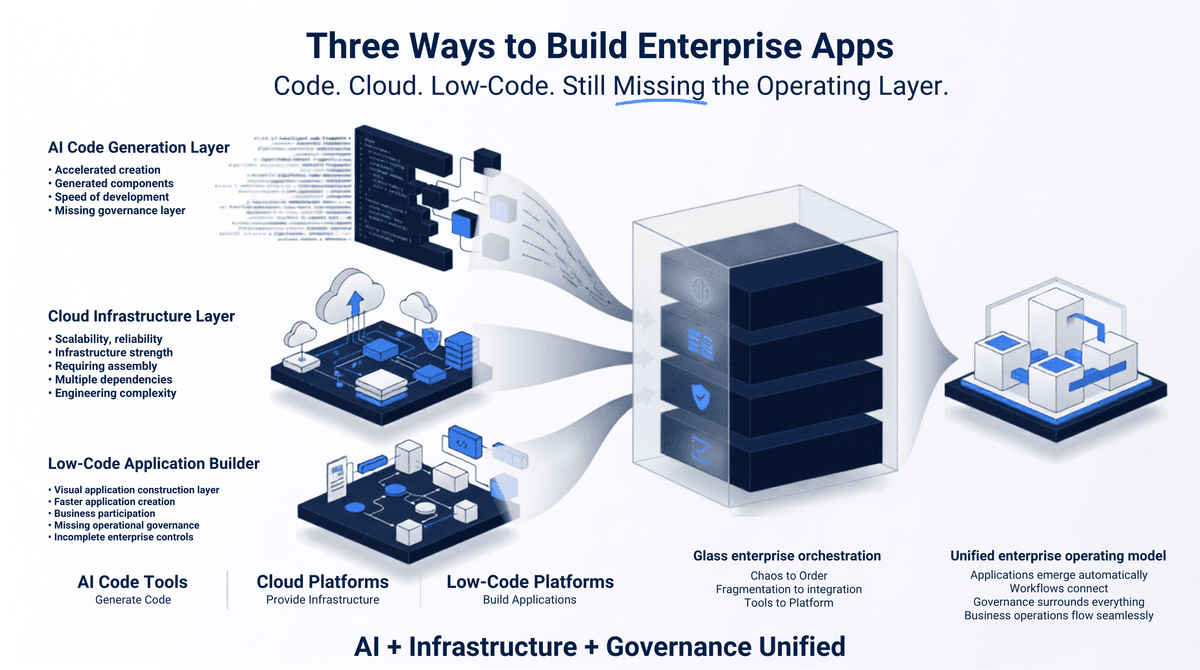
Low-code and no-code platforms are changing how we think about software. They offer a new way to make, build, and launch software. Unlike traditional software development, which needs a lot of hand-coding, these platforms use visual tools and ready-made parts. You can build apps by linking blocks together instead of writing long lines of code.
This method speeds up the development process. It also allows more people to create apps. Citizen developers, business users with little coding experience, can use these platforms to make apps that meet their needs. At the same time, professional developers can use these tools for complex tasks or to quickly create and test new ideas, making their work easier.
Defining Low Code Platforms
Low-code platforms are like special kits for creating software. They help users, even those who know little about coding, to make apps using simple tools and ready-made pieces. You can easily move parts around, connect tasks, and change functions without needing to write a lot of code. This is what low-code development is all about.
These platforms are great for businesses wanting to make their work better. They simplify tasks and automate processes, often without needing a deep knowledge of coding. Whether you need to build tools for staff, apps for customers, or automate certain jobs, low-code platforms offer the speed and flexibility to keep up with changing market needs.
It’s also important to know that “low-code” does not mean “no-code.” While these platforms cut down on the coding needed, some coding skills may still be needed for special changes, connections, or advanced features. This is where professional developers can help. They can work together with citizen developers to create strong and scalable applications.
Exploring No Code Platforms
No-code platforms make app development easier for everyone. Think about a world where anyone can create an app, even if they don’t have tech skills. This is what no-code platforms offer. They remove the need for traditional coding. This lets non-technical users, known as citizen developers, take part in making apps.
These platforms have simple visual designs. They use drag-and-drop features, pre-made templates, and clear logic flows. Users can build applications as easily as putting together a puzzle. This makes it very user-friendly. No-code platforms are great for creating simple apps for business needs. They help automate tasks or boost teamwork.
However, no-code platforms might not allow as much customization or integration as low-code ones. Still, their ease of use and quick setup make them perfect for fast prototyping and testing new ideas. They also help business users join in the app development process.
Comparing Low Code vs. No Code
Choosing between low-code and no-code depends on what your project needs. Low-code platforms are flexible. They allow for more customization. This makes them good for creating complex applications or integrating with existing systems. Professional developers can use their coding skills to make low-code platforms fit specific business needs.
No-code platforms focus more on being simple and easy to use. They are great for citizen developers and business users who don’t have much coding experience. These platforms help in quickly prototyping and creating basic applications without needing too much technical know-how. This lets business users meet their needs and react to market changes fast.
In the end, the best choice depends on how complicated the application is, the skills of the development team, and how fast you need to deploy. Many organizations benefit from using both low-code and no-code platforms. This hybrid approach helps empower different user groups and makes the development process easier.
The Rise of Low Code and No Code in India
India is seeing a big rise in the use of low-code and no-code platforms. This is part of a growing digital change. Companies, big and small, see how helpful these platforms can be. They help speed up new ideas, allow regular people to build apps, and fill the gaps in IT skills.
As India moves toward a more digital future, the need for faster software development will grow. This will continue to push the use of low-code and no-code tools. These platforms are more than just tools. They help Indian businesses stay competitive and quick to respond in a changing market.
Factors Driving Adoption
Many factors are making low-code and no-code platforms popular in India. First, businesses feel the need to provide digital solutions fast and efficiently. In this light, traditional software development can seem slow. Low-code and no-code platforms help solve this problem by allowing quick application development.
Second, there are more business users known as citizen developers. They have limited coding experience but still need accessible tools for development. No-code platforms allow them to create applications that meet their needs, helping to boost innovation in their companies.
Lastly, advanced technologies like machine learning and artificial intelligence are now part of these platforms. Businesses see the value in easily adding smart automation and insights into their applications. This move can improve how they operate and enhance customer experiences.
Impact on Indian Businesses and Startups
Low-code and no-code platforms are changing how businesses and startups in India create software. They bring many positive changes. These platforms help speed up application development. This means companies can launch new products and services faster than ever.
Startups with tight budgets find these platforms useful. They are a cost-effective way to traditional development methods. Startups can create prototypes, test ideas, and improve quickly. They do not need large development teams or deep coding skills. This easy access to high-tech tools allows for more innovation and supports new businesses to grow.
These platforms also make the development process simpler. This encourages better teamwork between business users and IT departments. When business users can join in the development, it leads to improved communication. This teamwork helps create applications that work better for the business goals.
Preparing for Your Low Code/No Code Journey
Starting your low-code/no-code journey needs careful planning and thought. This helps you get the most out of it. First, understand what you really need. Think about the problems you want to solve and the skills your team has. It is important to know if you need a simple solution for a specific job or a stronger platform for more complex application development.
You should also create a culture of learning and trying new things. Encourage your team to try out these platforms. They can join online groups and use the many resources available to improve their low-code/no-code skills. Investing in training and development at the start will benefit you later.
Essential Tools and Resources Needed
Equipping your team with the right code tools is very important for a successful low-code or no-code journey. Start by choosing a platform that fits your business needs and the skills of your team. Think about how easy it is to use, how it can connect with other tools, and what templates are available. This will help you make a good choice.
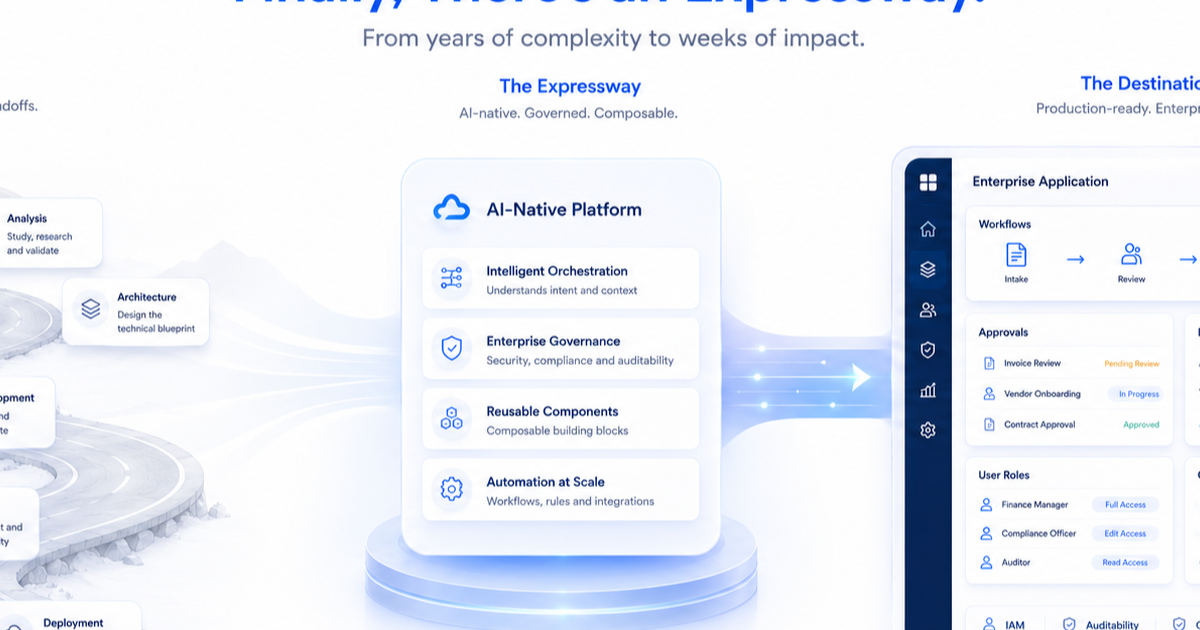
Looking into artificial intelligence and machine learning options on these platforms can open up new ways to use smart automation and get useful data insights. These tools, which used to seem complicated, are now easier to access. They let development teams create smarter and more powerful applications.
Providing complete training programs will help your team make the best use of the chosen platform. Many platforms have online courses, certifications, and support communities. These resources help with ongoing learning and skill growth.
Evaluating Your Requirements and Goals
Before you start with low-code or no-code development, think about your needs and goals. Write down the problems you want to solve and the results you want to see. If you want business users who do not code much to make simple apps, a no-code platform could be the best choice.
But if your project needs more complicated features, works with other systems, or needs a lot of customization, a low-code platform would fit better. Look at your team’s skills and check if they have the coding experience to make the most of a low-code platform.
You should also think about the development process. Low-code and no-code platforms often use agile methods. This means they allow for quick changes, fast testing, and quicker launches. Make sure your team is okay with this style and is ready to always improve and adapt.
A Step-by-Step Guide to Using Low Code/No Code Platforms
Navigating low-code and no-code platforms can feel hard at first. But, if you take a simple approach, you might find it easy to start building applications. The trick is to break the process into small steps. Start with a clear idea of what you want to achieve and then slowly move toward the final product.
This section will help you with the important steps. You will learn how to pick the right platform. Then, you will see how to design, integrate, test, and finally launch your first application. Each step will give you helpful tips. This way, you will feel ready to start your low-code or no-code journey confidently.
Step 1: Selecting the Right Platform
Choosing the right platform is important for your low-code or no-code journey. Many software solutions are available. You need to pick one that fits your business needs, skills, and budget. Start by looking closely at what you need and what you want to achieve. What kinds of apps do you want to create?
Think about these factors:
Ease of use: How easy are the platform’s visual development tools to understand?
Integration capabilities: Can the platform connect easily with your current systems and databases?
Security features: Does the platform have strong measures to keep your data and apps safe?
Scalability: Can the platform grow with your business if your apps become more complex?
Getting advice from other IT professionals or reading online reviews can give you good ideas and help you make your choice. The right code platform should feel like part of your team. It should help you create new applications quickly and well.
Step 2: Designing Your First Application
Once you pick your favorite platform, it’s time to make your app idea real. Start by sketching the main features you want to include. Think about how users will experience it and how to make the interface friendly and engaging. Most platforms give you ready-made templates and easy drag-and-drop tools. These tools can really help cut down your app development time.
Use these features to build a simple structure for your app. Focus on the key elements first. Don’t worry about small details right now. Instead, aim to create a minimum viable product (MVP) that you can improve later.
Keep in mind the great thing about low-code/no-code platforms. They let you make changes as you work. You can always add new features, change the design, or connect more data sources over time. The main point is to start simple, learn from user feedback, and keep improving your app.
Step 3: Integrating Data Sources and Services
Applications rarely work alone. They often need to connect with different data sources, APIs, or external services to function well. Integration is key to getting the most out of your application. Luckily, modern low-code/no-code platforms make this easy. They provide ready-made connectors, APIs, and user-friendly integration tools.
These platforms can help you link to cloud services, use data from older legacy systems, or add features from third-party providers. This gives you a flexible and smooth way to approach software development. Look at your integration needs early in the design process. Choose a platform that integrates easily with the systems you need.
Taking this step early will save you time and effort later. It makes sure your application gets all the data and features it needs to succeed. Keep in mind, an application’s strength often comes from its ability to connect different systems and use data well.
Step 4: Testing and Deployment
Thoroughly testing your application before deployment is crucial to ensure it functions as expected and meets user expectations. But unlike the often-complex testing phase of traditional software development, low-code/no-code platforms streamline this process, making it quicker and more efficient. Leverage the built-in testing tools offered by most platforms to simulate user interactions, identify potential bugs, and optimize performance.
Security should be a top priority throughout the development process. While low-code/no-code platforms often come with robust security features, it’s essential to ensure your application is protected against unauthorized access and data breaches. Carefully review the platform’s security settings, implement appropriate authentication mechanisms, and follow best practices for secure coding.
Deploying your application should be a seamless experience. Most platforms offer cloud-based deployment options, simplifying the process and allowing you to focus on delivering value to your users. Regularly backing up your data and having a disaster recovery plan in place are essential steps to ensure business continuity.
Conclusion
Low Code and No Code platforms are changing how businesses make apps. Their easy-to-use interfaces and drag-and-drop features allow anyone to create an app. Using this technology can greatly improve efficiency and spark new ideas in Indian businesses and startups. You can start your journey by checking your needs, picking the right platform, designing, integrating, testing, and deploying. For more help, sign up for a free trial. Discover the endless possibilities that these platforms provide. Start building your future today!
Frequently Asked Questions
What Are the Main Differences Between Low Code and No Code?
Low-code and no-code platforms use visual development tools to create apps. Low-code may need you to write a few lines of code for customization. On the other hand, no-code uses only a visual, drag-and-drop code approach for app development.
Can Non-Technical Users Really Build Apps with No Code Platforms?
No-code platforms are made for people with no coding experience. They allow nontechnical users to create apps easily. These platforms use simple visual tools and ready-made code systems. This way, you do not need technical expertise. Many platforms also have free trials. You can explore and test what they can do.
How Do Low Code Platforms Enhance Developer Productivity?
Low-code platforms help developers work faster. They offer easy tools for code development and have ready-made parts. This leads to quicker project completion. While it’s good to have some coding experience, these platforms make things easier. They let development teams concentrate on important business logic. This way, they can deliver business software solutions more effectively.
What Types of Applications Can Be Built with Low Code/No Code Platforms?
Low-code and no-code platforms can help meet many needs. They can create various applications. These range from simple business applications to complex enterprise applications. You can automate workflows, make customer portals, or build mobile apps. There are many options available. The features and how complicated the apps can be rely on what the platform offers for code app development. Some platforms even provide drop functionality tailored for specific industries or business needs.
Are Low Code/No Code Platforms Secure Enough for Enterprise Use?
Yes, many low-code or no-code platforms have strong security features. They help protect apps and data from unauthorized access. These platforms usually go through tough security tests and get compliance certifications. This is to make sure they follow industry standards. However, business users should still check the platform’s security settings. They should use strong passwords and keep best practices in mind when creating and launching apps. This is true even if the platform lets them easily drop components into their projects.
Next Steps
Request an enterprise demo to accelerate your process-to-app delivery.