Applications & operations Perspective
Streamline Your Ticket Triage with Low-Code Solutions
Streamline Your Ticket Triage with Low-Code Solutions Get Started Table of Contents Introduction Are these situations part of your service teams daily life?...

In this article 0 sections
Introduction
Are these situations part of your service team’s daily life?
1.Tickets get allocated to people not suitable, trained, or authorized to work on them.
2.Tickets come to light only when someone asks for an update from the client side.
3.Tickets pass through more than one layer of the helpdesk before they land in the right queue.
For 90% of service teams, this is so common that nobody is even particularly shocked when it happens. However, realize this: every time you let any of these situations happen, a customer somewhere is left waiting – their requests are not even close to being resolved.
This is why, despite good work and hard effort, customer satisfaction (CSAT) scores for most service teams don’t improve. But why do service teams struggle so much, when they have a CRM in place that promises to make life easy?
When the war cry on everyone’s lips is that of ‘automate, automate, automate’, why does so much work get done based on memory, intuition, and sometimes even guesswork?
What This Guide Covers
With this guide, we hope to answer some difficult questions about Low Code versus No-Code platforms and why service teams still struggle despite automation, such as:
- Why do traditional CRMs feel outdated the moment you start using them?
- What makes Low-Code platform development different from rigid service CRMs?
- Can a No-Code Low-Code platform really fix ticket triage issues?
- Why do automation tools often fail to reduce workload in customer service?
- What’s the real difference between Low Code versus No-Code, and which one suits service teams better?
- How can businesses use Low-Code platform development to keep up with changing customer expectations?
- What does an ideal service CRM look like, and how do Low-Code platforms fit into that vision?
Now, let’s break this down step by step.
Why Do Traditional CRMs Fail Service Teams?
Traditional CRMs look great till the time you buy them. Then you realize they are rigid and hard to modify once they are set up. Customizing them further is costly, and IT never seems to have the budget or time, because they are busy with urgent issues. This rigidity makes the CRM practically a roadblock for service teams. On one hand, you have a business that is changing every day and customer preferences evolving every day, and on the other hand, you have a system that is living in the past – this gap is the real problem.
The worst news is that this gap will keep on widening because of internal as well as external factors.
Internal Factors
Your business is not static; it’s dynamic. Your product and offerings evolve. How you deliver them also changes. You improve processes, introduce new workflows, and automate tasks, all of which alter the nature of issues. Additionally, as your product offerings change, so do your team’s skills and roles.
This ongoing evolution means your CRM must adapt to new workflows and issues, but traditional systems often fail to keep up.
External Factors
When you first begin with a service CRM and set up ticket triage rules, they are based on a set of initial assumptions about customer issues, product usage, and service expectations. However, these assumptions hardly ever align with reality. The real world is far more nuanced than broad-stroke assumptions can capture. Some issues might be completely unexpected, while others may require more attention than you initially anticipated.
Over time, if your CRM does a good job with data analysis, you will find trends. However, traditional service CRMs fail to adapt and force teams to resort to manual intervention, which increases errors.
What happens when your triage system can’t keep up with the dynamic nature of your business and your customers? It’s easy to guess: tickets end up in the wrong hands, leading to delays and frustrated customers. But,
How Low-Code Service CRMs Change Ticket Triage
To understand this, let’s first understand what is. Think of as a software development approach that shifts away from traditional coding to a more visual approach.
So, when you use a , you use visual tools to build your applications instead of writing code. With , you have visual editors, workflow builders, and templates for common use cases. You can create dashboards that fetch accurate data from any source and generate the needed reports. But how does this help you solve the problem of erratic ticket triaging?
How Low-Code Fixes Ticket Triage Issues
solves the problem of inflexible CRMs in several ways:
• You can model your ticket routing process exactly as you need. In fact, if you get your hands on a true , you will find that if you can draw a workflow on paper, you can also achieve it in the CRM. Every step, rule, and condition can be accurately represented.
• You can capture important data at each stage of ticket routing. This includes ticket details, who is assigned to them, and actions taken. You get built-in analytics and reporting tools to help you visualize ticket volumes, routing paths, and resolution times. This means you will be able to identify bottlenecks and inefficiencies the moment they appear.
• You will never get stuck with workflows that don’t reflect the ever-changing realities of your business processes. make it simple to adjust workflows and let you keep up with changing needs.
• You can make the work smoothly with your existing systems, such as your knowledge bases and other support tools. This ensures your ticket routing processes have access to relevant customer data and existing resources.
Now, would you choose any ? Or would you rather go with one that businesses like yours are already using every day, enjoying higher CSATs than ever before?
Why Amoga’s Low-Code Service CRM Is the Right Choice
At Amoga, we believe in developing platforms that empower end users. The people closest to the work are the best users of technology, so it should be simple and intuitive for them. They should be able to think like developers even if they are not developers.
This core value guided us when we built Amoga’s Low-Code service CRM. One of the most popular features our clients enjoy is smart ticket routing, which directly improves their customer satisfaction (CSAT) scores. Because our platform is built with ease of use in mind, developing new features and enhancements takes one-tenth the time and one-fourth the cost of traditional methods. This is exactly what makes a a game-changer for service teams.
Additionally, everything built on this platform complies with the highest security standards in your industry. This ensures that while your processes become more efficient, they remain secure.
If you feel your team’s ticket triage process can improve, you will love Amoga. Book a conversation with us, and we will understand your business and show you how Amoga can quickly and easily transform the way you handle ticket triage.
Contact us for a demo at a time that suits you.
Frequently Asked Questions - Low-code Ticketing Solutions
1. What is the best ticketing tool for small businesses?
A top ticketing tool for small businesses should be simple to set up and use, with room to customize. Low-Code platform development lets you tweak workflows easily, while Low Code versus No-Code platforms offer automation without coding. Look for cost-effective options that integrate with your systems-perfect for small teams needing efficiency.
2. Can a low-code ticketing system automate my IT helpdesk?
Yes, a No-Code Low-Code platform can automate your IT helpdesk. AI-driven routing assigns tickets to the right person, and Low-Code platform development cuts reliance on IT staff. Set up custom automation without coding, plus get real-time reports and dashboards to track performance. It’s a game-changer for efficiency.
3. What’s the difference between low-code and no-code ticketing systems?
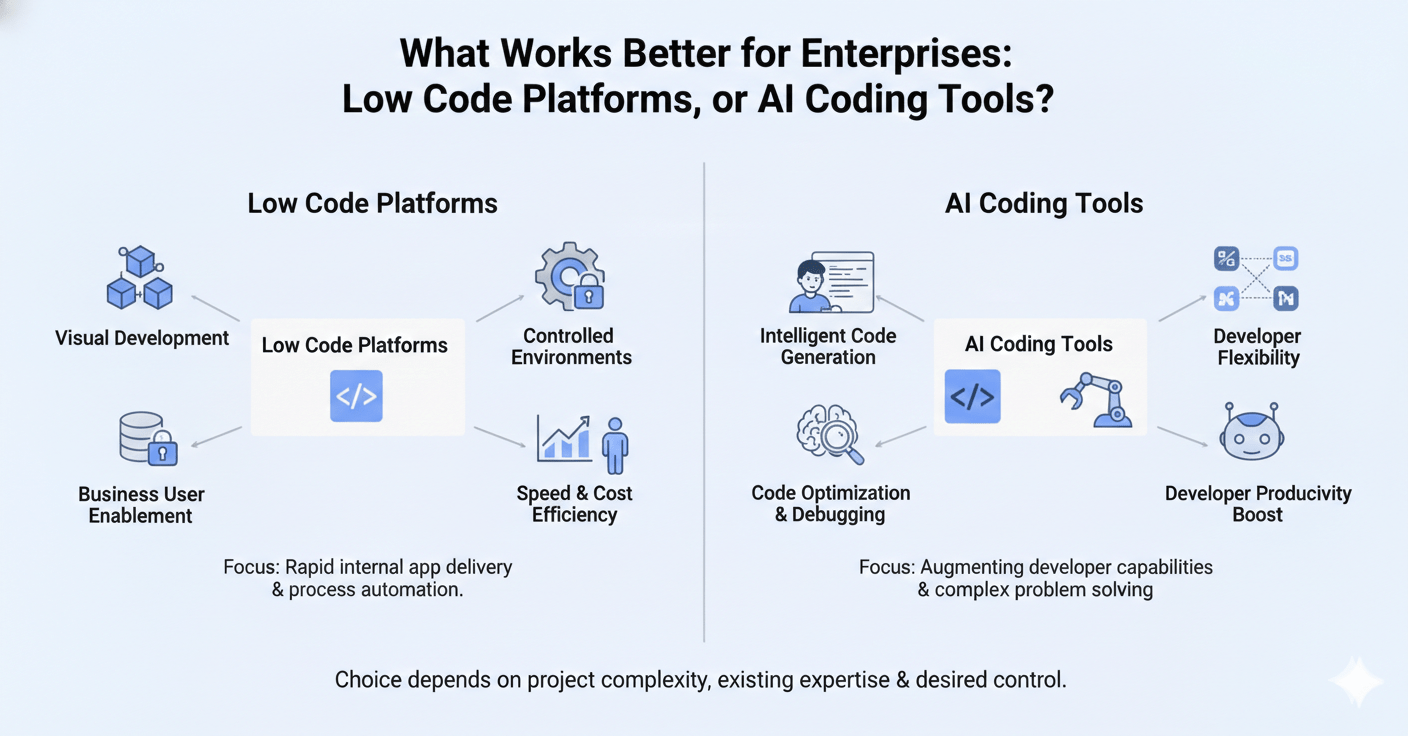
Low Code versus No-Code platforms both minimize coding, but they differ. No-Code Low-Code platforms suit simple workflows for non-tech users, while low-code offers more control for complex needs. Low-code provides flexibility to customize, whereas no-code keeps it basic. Your choice hinges on customization and control requirements.